Standoff 2 Fnmods Injector: Explore Mod Menu Features & More
| Size | 44mb |
| Version | v1.2.2 |
| Requirements | Android 6+ |
| Downloads | 9821 |
| Get it on |  |
Description
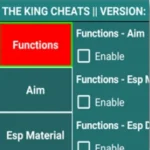
Standoff 2 is a fast paced first person shooter that combines tactical battles, competitive matches, different weapons, detailed maps, and several multiplayer modes. The official game includes 5v5 battles, 2v2 Allies, 1v1 Duels, Free for All, Team Deathmatch, and special themed modes. Players can also customize weapons with skins, stickers, and charms while participating in seasonal events and regular updates. For players interested in modified gameplay tools, the Standoff 2 Fnmods Injector provides a menu based system with additional gameplay controls. The available Fnmods menu includes different sections for player settings, game controls, skin customization, visual options, and chat features.
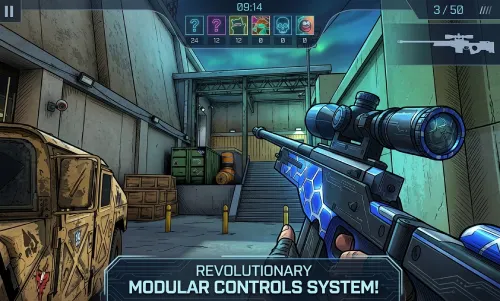
This guide explains the available features, download and installation process, how to use the injector, compatibility considerations, and important points users should understand before using it. If you want more relatable MODs Apps try Call of Duty Mobile Mod and G18 Gamer.
What Is Standoff 2 Fnmods Injector?
Fnmods Standoff 2 is a modified menu tool designed for Standoff 2. It provides a separate interface where users can activate different options instead of changing every setting individually. The menu is organized into several sections, including Player Menu, Game Menu, Skin Changer Menu, Visuals Menu, and Chat Menu. The available controls can change the way certain gameplay elements work.
The Fnmods menu is designed around Standoff 2 and should be matched with a compatible game version before installation.
Standoff 2 Fnmods Features
Player Menu
- Speed
- Air Jump
- Money
- No Recoil
- Wallshot
- Drop Knife
- Fast Defuse
- Fast Plant
- FOV
Game Menu
- Kill All
- Mass Kill
- Telekill
Skin Changer Menu
Available options include:
- Karambit
- Karambit Gold
- Karambit Klaw
- Karambit Sketch
- Karambit Frozen
- Tanto Knife
- Tanto Dojo
- Tanto Yakuza
- Tanto Malachite
- Tanto Pearl Abyss
- Tanto Flow
- Butterfly
- Butterfly Legacy
- Butterfly Starfall
- Butterfly Black
- Butterfly Storm
Visuals Menu
The Visuals Menu includes two listed options:
- Chams
- Wire Frame
These settings change how selected visual elements appear during gameplay.
Chat Menu
The Chat Menu provides a Spam Chat option. Users should use chat related functions carefully, especially during multiplayer matches.
What Is Available in the Original Standoff 2?
The original Standoff 2 offers a large selection of weapons, competitive battles, weapon customization, clans, seasonal content, and different game modes. The official listing currently describes more than 25 weapons, including rifles, sniper rifles, and pistols. Players can participate in 5v5 matches, 2v2 Allies, 1v1 Duels, Free for All, Team Deathmatch, tactical battles, and special modes. The game also supports weapon skins, stickers, charms, Battle Pass rewards, cases, and seasonal content.
The Fnmods injector adds its own menu options on top of the normal game experience.
How to Download Fnmods Standoff 2 Injector
Follow these basic steps to download the compatible Standoff 2 Injector APK:
- Find the Fnmods injector file for your Standoff 2 version.
- Check the release information before downloading.
- Download the required APK file to your Android device.
- Wait until the download finishes completely.
- Locate the downloaded file through your device’s file manager.
- Check that the downloaded file matches the intended Fnmods release before continuing.
Always check compatibility before installing because an injector designed for an older Standoff 2 build may not work correctly with a newer game version.
How to Install Standoff 2 Fnmods Injector
After downloading the required file, follow these steps:
- Open the downloaded APK file.
- If Android asks for installation permission, review the permission for the source you used.
- Continue with the installation process.
- Wait until Android completes the installation.
- Open the installed Fnmods injector.
- Follow any setup instructions provided with the specific release.
- Launch Standoff 2 only after completing the required setup.
Do not install files that have unexpected names, request unrelated permissions, or behave differently from the stated application.
How to Use Fnmods Injector
- Open the Fnmods injector.
- Complete any required initialization.
- Launch Standoff 2 if the injector requires the game to be running.
- Open the Fnmods menu.
- Select the section you want to use.
- Review the available Player, Game, Skin Changer, Visuals, or Chat options.
- Enable only the features you understand.
- Return to the game and check whether the selected option works correctly.
- Disable an option if it causes instability or unexpected behavior.
The menu can contain several controls, so users should activate them individually instead of enabling everything at once.
Fnmods Menu Sections at a Glance
| Menu | Available Options |
|---|---|
| Player Menu | Speed, Air Jump, Money, No Recoil, Wallshot, Drop Knife, Fast Defuse, Fast Plant, FOV |
| Game Menu | Kill All, Mass Kill, Telekill |
| Skin Changer | Karambit, Tanto, Butterfly and listed variants |
| Visuals | Chams, Wire Frame |
| Chat | Spam Chat |
Standoff 2 Gameplay and Game Modes
Standoff 2 focuses on tactical first person shooter gameplay. Players can select different modes depending on the type of match they want to play. The official game currently includes 5v5 fights, 2v2 Allies, 1v1 Duels, Free for All, Team Deathmatch, and other special modes. The game also supports competitive ranking, clan battles, weapon customization, seasonal events, and regular content updates. New updates can introduce maps, mechanics, modes, skins, and limited time content. Because the game changes over time, users should always check whether their Fnmods release matches the current Standoff 2 version.
Fnmods Injector Compatibility
Compatibility is one of the most important points when using a Standoff 2 Mod. The injector needs to work with the particular Standoff 2 build installed on the device. An older Fnmods release may stop working after the game receives an update. It can also cause loading problems, crashes, or unavailable menu functions when the versions do not match.
Before installation, check:
- Standoff 2 version
- Fnmods release version
- Android compatibility
- Required installation method
- Available menu functions
What Fnmods Does Not Provide
The Fnmods menu should not be confused with official Standoff 2 features. Functions such as the Fnmods Player Menu, Game Menu, Visuals Menu, and Skin Changer are not standard controls provided by the official game. The original game instead provides its own weapon customization, competitive modes, clans, seasonal rewards, and regular updates. Also, the availability of a feature in one Fnmods release does not mean that the same feature will remain available in every future release.
Safety and Account Considerations
Users should take care when installing any modified game tool. Check the file before installation and avoid providing unnecessary personal information or permissions. It is also important to understand that modified gameplay tools can change the normal competitive experience. Standoff 2 describes its competitive gameplay as skill based, with teamwork and player abilities playing a central role. Using modification features in online matches may therefore create account or gameplay risks. Users should review the game’s current rules before using an injector.
Why Fnmods Can Stop Working
- The Standoff 2 version has changed.
- The Fnmods release no longer matches the game build.
- A menu feature has become incompatible.
- Android has blocked a required permission.
- The injector installation was incomplete.
- The game received an update that changed its internal systems.
Conclusion
The Standoff 2 Fnmods Injector provides a menu based collection of gameplay controls, including Player Menu, Game Menu, Skin Changer, Visuals, and Chat options. Its listed features include speed, air jump, no recoil, wallshot, FOV, kill controls, teleportation related options, knife skins, visual settings, and chat controls. The original Standoff 2 continues to offer competitive multiplayer battles, different game modes, weapon customization, clans, seasonal events, and regular updates. Before installing Fnmods Standoff 2 Mod, users should check compatibility with their current game version and understand the possible account and gameplay consequences of using modification tools.
Download links
How to install MOD Standoff 2 Fnmods Injector: Explore Mod Menu Features & More?
1. Tap the downloaded Standoff 2 Fnmods Injector: Explore Mod Menu Features & More MOD file.
2. Touch install.
3. Follow the steps on the screen.